


LightX AI Photo Editor Retouch
4.26.66K Reviews
App Specs
- Version
- 2.5.10
- Updated On
- License
- Free
- Downloads
- 50,000,000+
- Developer
- AndOr Communications Pvt Ltd
- Categories
- Photography
- Platform
- Android, iOS
Screenshots




 Analysis by AppCompare
I use LightX AI Photo Editor Retouch as an all-purpose photography app rather than as a replacement for a full desktop editor. It brings retouching, background removal, creative filters, and ordinary photo adjustments into one mobile workspace, which makes it especially useful when I want to improve a picture quickly without moving between several apps. The experience is familiar enough for casual editing, but it also has enough control to reward a little patience.
LightX is developed by AndOr Communications Pvt Ltd and is available as a free app for everyone. It supports Android devices running version 8.0 or later, and the current version is 2.5.10. Its popularity is easy to understand: the app has passed 50 million installs, with an average rating of 4.2 from around 502 thousand ratings. Those figures do not guarantee that every tool will suit every person, but they do show that this is an established editor rather than a tiny experiment.
How LightX fits into everyday photo editing
I find LightX most useful when a photo needs more than a quick brightness tweak but less than a full desktop edit. In this section, I’ll look at how its mix of retouching, background work, and creative treatments fits into ordinary routines, then turn to what its current version can—and cannot—tell us about the app’s evolution.
A practical mix of retouching and creative tools
The main appeal is the range of jobs handled in one place. I can start with a normal camera image, clean up a distracting detail, change the background, apply a more expressive look, and finish with basic adjustments without opening a separate editor for each step. That combination is more useful than a simple filter app because it covers both correction and transformation.
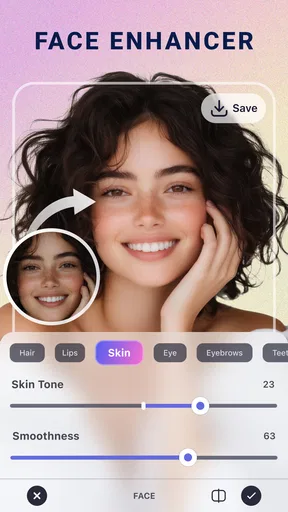
The retouching side is best suited to small, deliberate improvements. For example, if I have a portrait with a temporary blemish or an object that pulls attention away from the subject, I can work on the image instead of applying a heavy effect to the entire frame. The important distinction is restraint. LightX can help polish a photo, but the result depends on zooming in, checking edges, and avoiding repeated edits that make skin or textures look artificial.
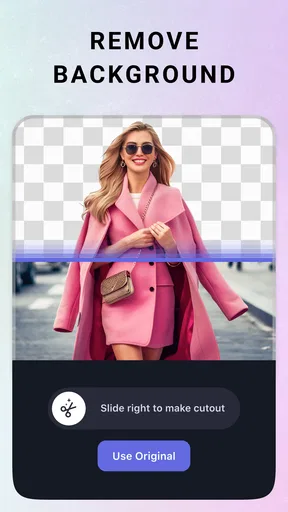
Background removal is another reason to keep the app installed. It is useful for profile images, simple product-style pictures, social posts, and playful compositions. I find it most effective when the subject has a clear outline and good contrast with the background. Hair, transparent objects, and cluttered scenes are more demanding, so I would always inspect the cutout before treating it as finished.
A realistic workflow for a busy day
Imagine taking a quick portrait before heading to an event. The lighting is acceptable, but the wall behind you is messy and a small mark on your shirt is noticeable. In LightX, I would first crop the composition, make a restrained retouch, remove or replace the background, and then use an AI filter only if the original colors feel flat. I would finish by comparing the edited version with the original before saving.
Worth Reading Before You Choose

EA SPORTS FC Mobile 26 Is a Bigger Football Game, but It Takes Time

Flipboard Shows What News Apps Must Do Beyond the Feed

Switching to Android Auto Means Rethinking Your Driving Routine

Google Calendar Makes a Crowded Week Easier to Manage

Ludo King Makes the Most of the Minutes Between Plans

Baby Panda World Brings Quick Play to Modern Phones, but Its Game Library Feels Busy
That last check matters because filters can make an image look impressive in the editor while weakening the details that made the original believable. I recommend making the correction layers or adjustments in small stages where possible, rather than trying to solve everything with one dramatic preset. The app is more convincing when used as a controlled editor than when treated as a button that automatically fixes every problem.
Where the free access matters
LightX is free to install and use as an entry point, which lowers the risk for someone who only edits occasionally. You can explore the editing approach before deciding whether it deserves a permanent place on your phone. The app also includes in-app purchases priced from $0.99 to $59.99 per item, so the free starting point should not be confused with unlimited access to every possible paid element.
For me, that makes the value question depend on frequency. A person who edits a few holiday photos may get enough from the free experience and never need to spend anything. Someone who repeatedly creates portraits, promotional images, or social content may find paid items more relevant, but should consider the total cost of the particular tools they actually intend to use rather than assuming every feature is included.
I appreciate that the purchase range covers small optional spending as well as much more substantial individual items, but it also means I would inspect each purchase screen carefully. The sensible approach is to try the workflow first, identify the exact feature that saves time, and only then decide whether its price is justified. If you want a completely predictable one-time editing cost, this model may feel less comfortable than a simpler editor with a clearly defined purchase.
AI tools are helpful, not infallible
The AI-focused features make LightX approachable because they reduce the amount of manual work needed for common edits. They are particularly handy when I want a quick visual direction rather than a technically perfect composite. Still, automatic selection and generated styling should be treated as a first pass. I would check the subject outline, facial details, small accessories, and areas where the background meets the person.
A useful habit is to keep the original image untouched and export a separate result. That gives me a safe reference if the filter changes the mood too much or the background cutout loses detail. It also makes it easier to compare whether the edit genuinely improves the photograph or merely makes it more noticeable.
Comparing it with the usual alternatives
Compared with a basic phone gallery editor, LightX offers a broader creative range. A built-in editor is usually faster for exposure, cropping, and rotation, but it may not provide the same combination of retouching, background work, and stylized filters. If my only need is to brighten a dark image, opening the gallery editor is often quicker. If I need to isolate a subject or reshape the overall presentation, LightX has a stronger reason to be involved.
Compared with a dedicated retouching app, LightX is more versatile but may feel less focused. A specialist can be preferable when the entire session is about precise skin cleanup or removing many small distractions. LightX makes more sense when retouching is only one stage in a larger edit.
Compared with a professional desktop editor, the advantage is convenience, not maximum precision. I can work directly on a phone and finish a social image without learning a complex desktop interface. However, demanding composites, extensive color work, or pixel-level control are better handled by software designed around a larger screen and a more detailed workflow.
Small techniques that improve the results
My first practical tip is to crop before applying a strong effect. A tighter composition helps me judge whether the retouching and background decisions support the subject. It also prevents me from spending time polishing areas that will eventually be removed from the frame.
My second tip is to use background removal for purpose, not simply novelty. A clean background can make a profile photo easier to read, while a busy replacement can create a new distraction. I prefer a background that matches the lighting and perspective of the subject; otherwise the cutout may look pasted on even when the edges are technically clean.
My third tip is to compare filters at reduced intensity whenever the app allows that kind of adjustment. A subtle color shift often preserves more facial texture and clothing detail than the strongest version. This is especially important with portraits, where exaggerated smoothing can remove the expression and character that made the photo worth editing.
A fourth useful workflow is to make a duplicate before experimenting with AI effects. I can then try an unusual style without losing the natural version. This is a simple step, but it prevents the common mistake of turning a quick experiment into the only saved copy of an important image.
Tradeoffs I noticed while judging the app
The broad feature set is also the main source of friction. An app that combines retouching, background removal, filters, and other editing tasks can feel less direct than a tool built around one job. I sometimes need to decide which route to take before I can make progress, especially when an automatic option and a manual correction could both solve the same problem.
There is also a learning curve hidden behind the friendly concept. Basic edits are approachable, but good results require judgment about selection edges, filter strength, and the order of operations. A new user may get a quick result immediately, yet need several attempts to produce something that looks natural rather than obviously processed.
AI assistance does not remove the need for review. Uneven edges, overdone facial changes, or a background that does not match the subject can reduce the quality of an otherwise attractive edit. I would not use an automatic result for an important image without checking it at a useful zoom level.
The purchase structure is another consideration. Since individual in-app items range from $0.99 to $59.99, LightX can be inexpensive for occasional extras but potentially costly for someone who wants a broad collection of paid capabilities. I would skip a purchase if I only need one simple correction that the phone’s built-in tools already handle well.
Device compatibility is reasonably accessible because Android support begins with version 8.0, but the quality of any editing session will still depend on the phone itself, the source image, and available working room on the screen. I would be more comfortable doing detailed edge work on a larger display than on a small phone, regardless of which mobile editor I chose.
Who is most likely to get value?
LightX is a good fit for social media users who want more than filters but do not want to learn a professional desktop program. It suits people who regularly create portraits, profile pictures, simple promotional graphics, or visual experiments and prefer having several tools together. It is also appealing to anyone who often starts with an ordinary photo and wants to turn it into something more deliberate.
It can be useful for small sellers and freelancers who need a cleaner subject image for a post or listing. I would still inspect the result carefully, especially around product edges, labels, and thin objects. A fast background edit is valuable only if it does not remove part of the item or create a distracting halo.
Casual users may appreciate the free entry point, particularly if they want to test retouching or background changes without committing to a paid editor immediately. The Everyone content rating also makes it broadly suitable for general audiences, though younger users should still understand that optional purchases are available inside the app.
Who should choose something else?
I would not choose LightX as my first option for serious professional color grading, complex multi-layer composition, or highly controlled print preparation. A desktop editor is a better match when precision, repeatability, and a large work area matter more than convenience.
I would also skip it if my needs are limited to occasional cropping and brightness changes. The built-in photo editor on a phone can be faster and simpler for those jobs. Adding a feature-rich app is worthwhile only when its retouching, background, or creative tools solve a problem the basic editor cannot.
Likewise, users who dislike optional purchases should examine the free workflow before investing time in it. The app is not a poor value simply because paid items exist, but its suitability depends on whether the available free tools cover your routine and whether any upgrade produces a meaningful improvement for you.
My buy-or-skip verdict
I recommend trying LightX if you want a flexible mobile photography editor that combines portrait cleanup, background removal, and AI-style creativity. The free installation makes experimentation straightforward, and the app has enough range to replace several lightweight tools in a casual workflow. I especially like it for quick social images where speed and visual variety matter.
I would keep expectations realistic. Automatic editing is a starting point, not a guarantee of a polished result, and the broad toolset takes practice to use naturally. Before paying for anything, I would complete a few real edits, identify the feature I repeatedly use, and decide whether the specific purchase is worth it. That approach separates genuine value from the temptation to collect effects.
My final view is positive for everyday creators and occasional portrait editors, but more cautious for professionals and minimalists. If you want one phone-based workspace for making ordinary photos more presentable or more imaginative, LightX is worth testing. If you only need basic corrections, prefer a fixed-cost tool, or demand advanced desktop-level control, I would skip it and choose a simpler or more specialized alternative.
Pros
- AI tools quickly remove objects
- backgrounds
- and unwanted details.
- Layer-based editing offers more control than most basic mobile editors.
- A broad selection of filters
- effects
- frames
- and creative overlays is available.
- Portrait retouching can smooth skin and enhance facial features with little effort.
- Projects can be edited on the go with an interface suited to touchscreens.
Cons
- Many advanced AI tools and effects require a paid subscription.
- Some edits may look artificial when settings are pushed too far.
- Export options and high-resolution results can be limited on the free plan.
- The large number of tools may feel overwhelming for first-time users.
- Processing complex AI edits can take longer on older or less powerful phones.
FAQs for LightX AI Photo Editor Retouch
What is LightX AI Photo Editor Retouch used for?
LightX AI Photo Editor Retouch is a mobile editing app designed for enhancing portraits, removing unwanted objects, changing backgrounds, applying artistic effects, and creating AI-assisted image transformations. It combines traditional editing tools such as cropping, filters, adjustments, and retouching with automated features that can simplify more complex edits. It is suitable for casual users, social media creators, and anyone who wants to improve photos without using professional desktop software.
Is LightX AI Photo Editor Retouch free to download and use?
The app can generally be downloaded for free, but some tools, effects, templates, or AI features may require in-app purchases or a premium subscription. Free access can vary depending on the platform and the current version of the application. Before editing extensively, users should check the subscription screen carefully, including the trial duration, renewal price, and cancellation conditions, to avoid unexpected charges.
Does LightX AI Photo Editor Retouch require an internet connection?
Some basic editing functions may work without a permanent internet connection, especially when using locally stored photos and standard adjustment tools. However, AI-powered features, cloud processing, online resources, advertisements, account services, and premium content may require internet access. Performance can also depend on connection quality. Users should expect the best experience when connected to a stable Wi-Fi or mobile data network.
Can LightX remove objects, change backgrounds, or retouch faces automatically?
LightX includes tools intended to simplify common photo-editing tasks such as removing distractions, improving portraits, replacing backgrounds, and applying automatic enhancements. Results can be impressive on clear images with good lighting, but they are not always perfect. Fine details such as hair, fingers, transparent objects, and complex backgrounds may need manual correction. Reviewing the final image before saving is recommended.
Are photos edited with LightX private and safe?
Privacy depends on how a particular feature processes images and on the permissions granted by the user. Standard edits may be handled directly on the device, while certain AI tools can require an image to be uploaded for processing. Users should review the app’s current privacy policy, avoid granting unnecessary permissions, and be cautious when editing sensitive or personal photographs. Do not upload confidential images unless you understand how they are handled.


